I know, you downloaded your kit and suddenly came across a file .zip or .rar and you don't know what to do with it. Don't worry—here's a step-by-step guide to help you understand what it is and how to use it.
Most of our kits contain more than one file; therefore, to speed up the download, file compression tools are usually used to group a set of specific files into a single file.
First of all, you need to know that in order to unzip a .zip or .rar (It's one of the typical file extensions used to identify this type of file.) You'll need to have a compression and decompression program installed. If you don't already have one, there are many free programs available online that you can download. I recommend WinRAR, which is easy to use and free in its basic version (you can download it from the following link www.winrar.es)
If you already have a program installed for compressing and decompressing .zip or .rar files, you can follow these steps:
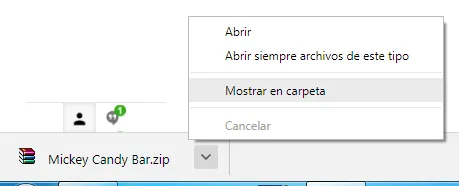
Once you've downloaded your kit, locate the file .zip or .rar on your computer. If you don't remember where you downloaded it, you can easily find it from the download notification in your browser by opening the menu and clicking “Show in Folder.”.
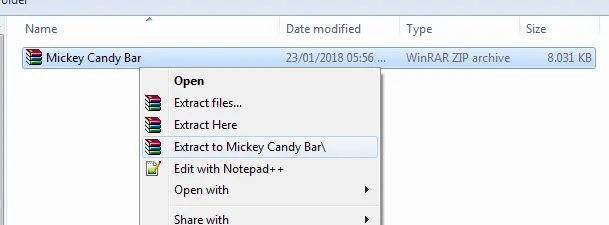
Once you've located the file, place the cursor over it and right-click to display the following menu.
Select "Extract to"
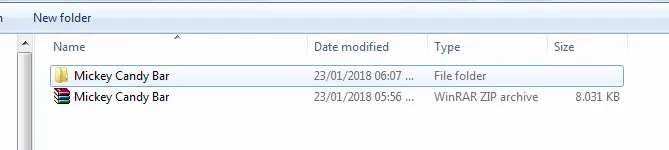
Once the compressed file is extracted, it appears as a yellow folder.
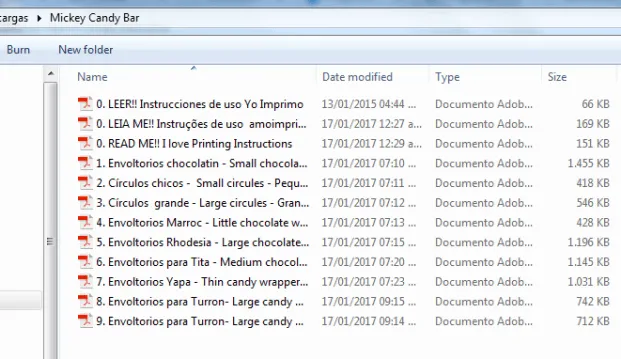
And that's it! Now you have all the files from your kit inside the folder.
 Clipart
 Vectors
 Digital Papers
 3D cutting
 PowerPoint Kits
 Chip bags
 Giant Duvalín
 Video Invitations
 Cake toppers
 School Labels
 Mugs
 Cushions